Guides · Acquisition
Cookieless analytics for SaaS: what you can measure without a cookie banner
What you can still count about your visitors without cookies, what you can't, how it works under the hood, and why your signed-in users are a different question.
A cookie banner costs you twice. Part of your visitors click "reject" and disappear from your numbers, and everyone else starts your site with a pop-up instead of your headline. For a small SaaS, where every visit counts, that's a lot to pay for analytics.
The good news: most of what a founder needs to know about visitors doesn't need cookies at all. This guide is what you can measure without them, what you give up, and where the line sits once someone signs up.
This is how it works in practice, not legal advice. If you're unsure about your case, ask someone who knows your market's rules.
Why analytics usually needs a banner
In the EU and the UK, the rule behind cookie banners isn't really about cookies. It's about storing or reading anything on the visitor's device (cookies, local storage, device ids) when it isn't strictly needed for what they asked for. Analytics isn't strictly needed, so it needs consent.
Tools like Google Analytics recognise a returning visitor by an id they keep in a cookie. That's why they need the banner, and why the visitors who say no simply aren't counted.
Some regulators, such as France's CNIL, allow audience measurement without consent under strict conditions. The simpler route is not to store anything on the device in the first place.
How cookieless counting works
Instead of an id on the device, the server works out a short-lived fingerprint from what every request already carries, and forgets it quickly:
- Take the site, the visitor's IP address and their browser's user agent.
- Mix in a random salt that changes every day, and hash it all.
- Use that hash to count the same visitor once that day, then delete it.
Nothing is stored in the browser, so there's nothing to consent to. Because the salt changes daily, the same person can't be followed from one day to the next, or from one site to another.
What you can measure
More than you'd think:
| Question | Without cookies |
|---|---|
| How many people visit each day | Yes |
| Where they come from (Google, Reddit, a newsletter, an ad) | Yes |
| Which page they land on and which ones they read | Yes |
| How long they actually read each page | Yes |
| Where they click "Sign up" and where they leave | Yes |
| Country and kind of device | Yes |
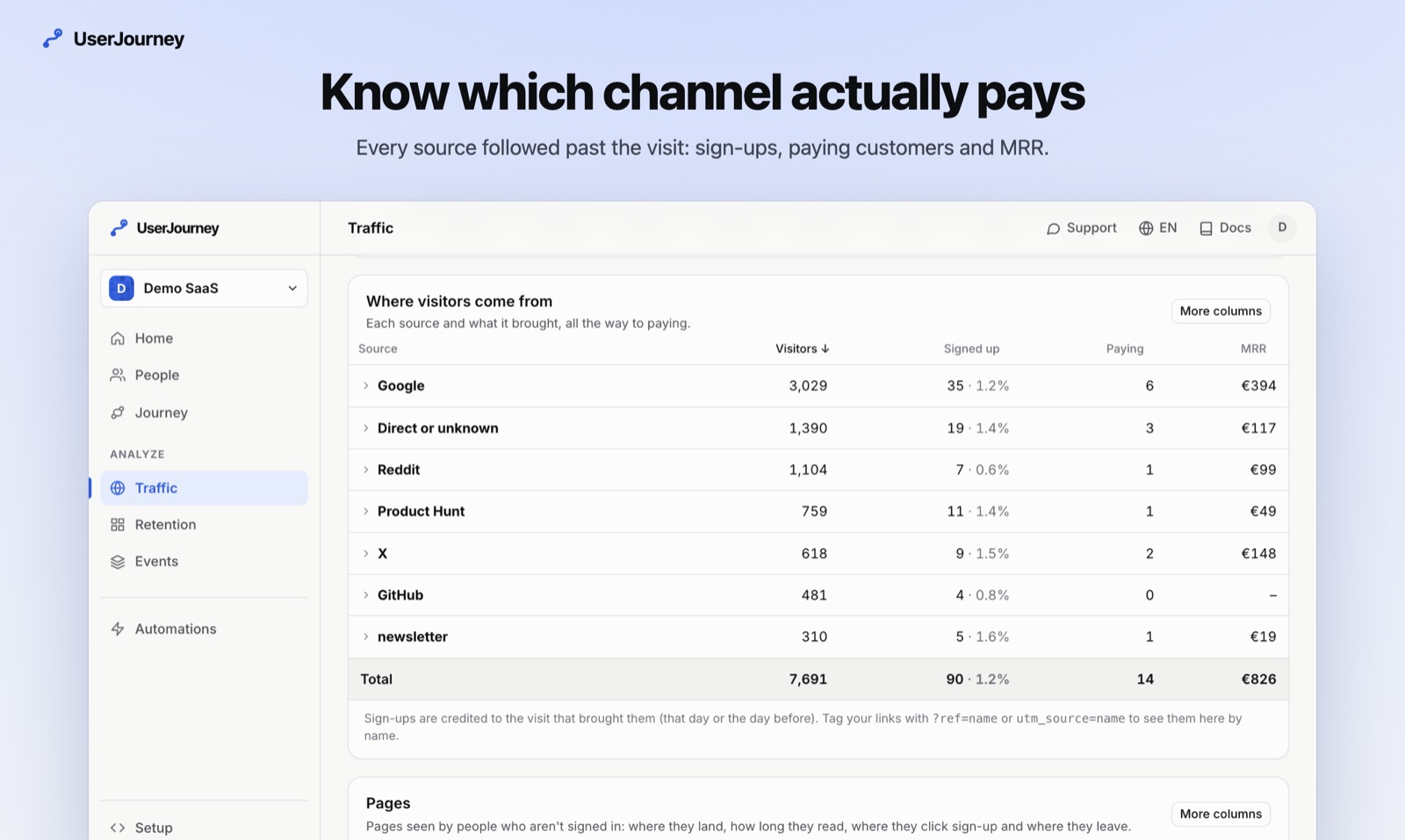
| Which source brings sign-ups, and paying customers | Yes, once they sign up |
What you give up
Be honest about the trade-off:
- Returning visitors over weeks. Someone who reads your blog on Monday and comes back on Friday counts as two visitors. For a small SaaS this matters less than it sounds: what you care about is the visit that led to a sign-up.
- Long attribution windows. You can credit a sign-up to the visit that brought it that day or the day before, not to an ad someone saw three weeks ago.
- Cross-device journeys before sign-up. A visit on the phone and a sign-up on the laptop are two separate visitors.
Once someone signs up, it's a different question
A signed-in user isn't an anonymous visitor any more. They have an account with you, you already know their email, and following what they do in your product is part of running it. Your privacy policy says so, and your terms cover it.
That's where product analytics starts: which onboarding step they reached, whether they activated, whether they pay. The sign-up is also what connects the two worlds: the visit that brought them is known at that moment, so you can see which channel brings customers without ever having followed anyone around before they chose to sign up.
A setup that needs no banner
- Count visitors without cookies, with a daily salt, and keep only daily totals after a day or two.
- Store pages without their query string and replace ids and emails in paths with a placeholder, so
/invite/ana@acme.ionever reaches your analytics. - Identify people only once they sign in, with your own user id.
- Write it down: one honest paragraph in your privacy policy about what's counted and how long it's kept.
Doing it with UserJourney
UserJourney counts visitors exactly this way: a hash of a daily salt, the site, the IP address and the browser, deleted after two days and never stored with anything about the person. No cookies or local storage are used for visitors, so no banner is needed for it. Paths are stored without their query and with ids, tokens and emails replaced by :id.
Once someone signs in, one line makes their pages theirs:
uj.identify(user.id, { email: user.email })Traffic then shows every source next to the sign-ups, paying customers and revenue it brought. Exactly what is stored, or start for free.
More guides
Which marketing channel brings paying customers, not just visits
Visits per channel are easy to count and easy to misread. How to follow each channel to sign-ups, activation and revenue, and the traps attribution sets for a small SaaS.
3 min readToolsThe best product analytics tools for a small SaaS in 2026
Six analytics tools a small SaaS team actually picks between, what each is best at, what it costs and what it asks of you, so you can choose in ten minutes instead of a week.
6 min read